
Organization Settings
Admin List
本頁內容尚未翻譯。
Admin List is where Owner / Admins view, invite, and remove the organization’s admins. LumiTure uses two management levels — Owner and Admin — alongside the Tier 1 / Tier 2 Manager and Member roles.
Availability
Section titled “Availability”Admin List is core IAM and is included on every plan.
The Admin List page
Section titled “The Admin List page”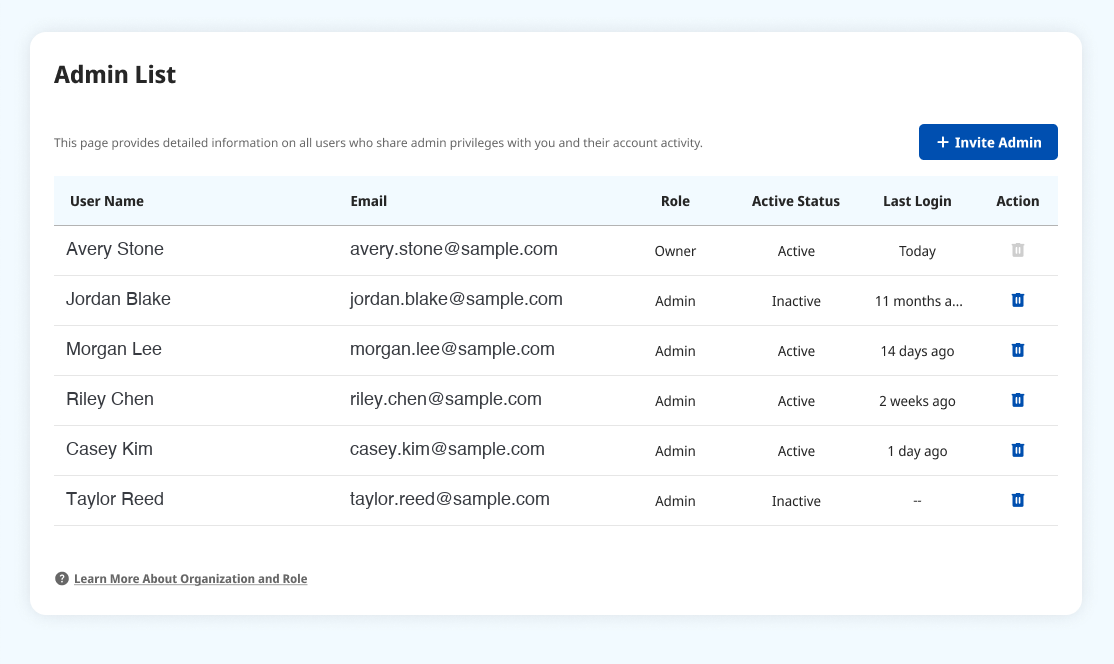
Each row shows the User Name, Email, Role (Owner / Admin), Active Status, and Last Login. Use Invite Admin to add one. A newly invited admin receives an activation email and appears as Inactive until they activate (see Activate Account).
Inviting an admin
Section titled “Inviting an admin”Click Invite Admin, enter one or more emails (comma-separate to add several), and confirm. Each invitee gets an activation email.
Removing an admin
Section titled “Removing an admin”Removing an admin requires a double confirmation (type the confirmation string). You cannot bulk-delete or one-click delete — each removal is confirmed individually.
The roles
Section titled “The roles”- Owner — creates the organization and fills in its details. There’s exactly one Owner per org (transferable). Has all of Admin’s powers, plus managing the admin list.
- Admin — added by the Owner. Full create / edit / delete over all groups and users, and can add org resources and assign them to groups. Can delete a group only when its member list is empty.
- Manager (T1 / T2) — added or removed by Owner / Admin (peers can’t add each other); belongs to one group (changeable). Manages users in their own group and edits its dashboard; a T1 Manager can assign resources to their T2 groups and see their own T1 plus what’s assigned to those T2 groups. Cannot touch peer groups’ resources.
- Member (T1 / T2) — added or removed by Owner / Admin / Manager; belongs to one group. Read-only within their group; cannot create, update, delete, or add people.
Permissions
Section titled “Permissions”| Action | Owner | Admin | Others |
|---|---|---|---|
| View Admin List | Yes | Yes | Page not visible |
| Invite Admin | Yes | Yes | — |
| Remove Admin | Yes | Currently limited to Owner | — |
Notes & edge cases
Section titled “Notes & edge cases”| Situation | Behavior |
|---|---|
| Number of Owners | Exactly one per org; transferable, never two. |
| Deleting a group | Only when the group’s member list is empty. |
| Manager / Member membership | Each person belongs to one group (changeable); peers can’t add each other. |
| Removing an admin | One at a time, with a typed confirmation — no bulk delete. |